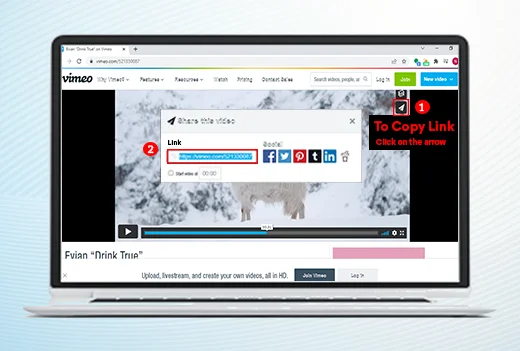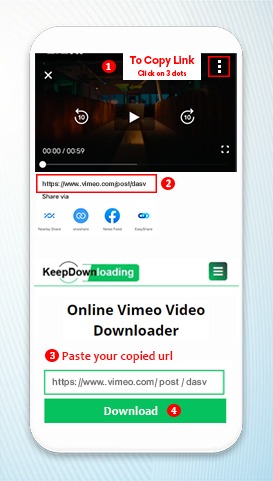
Go to the Vimeo website and select your favorite video that you want to download. Select the URL of the video from the address bar of the browser and highlight it.
Copy the URL of the Vimeo video from the browser’s address bar. If you are unable to find the correct URL of the Vimeo video, then share the link of the Vimeo video.
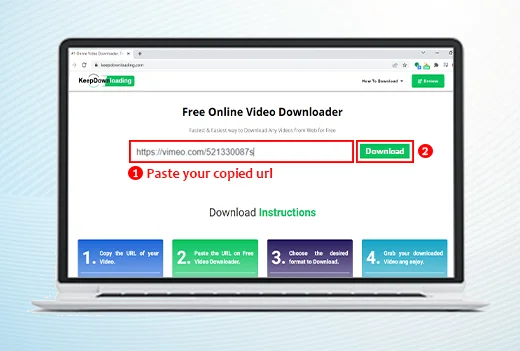
After you have copied the link of the Vimeo video, open the video downloader on the www.keepdownloading.com browser.
Click the Download Vimeo video option. An address box will appear on the top of the page.
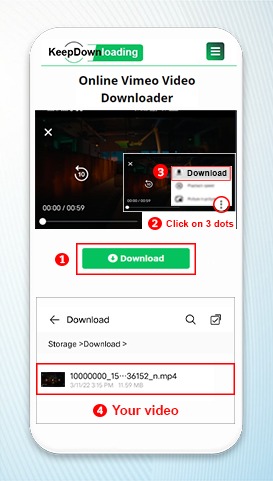
Paste the URL on the address box of the Vimeo video downloader. Click the Download button. Usually the download starts automatically.
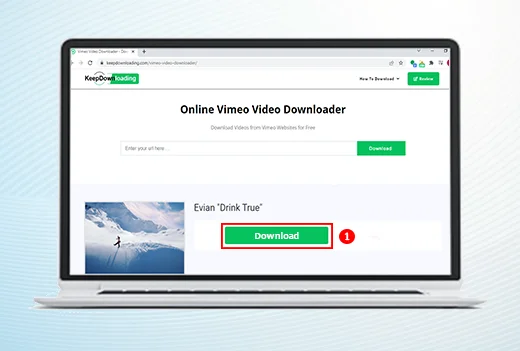
Select the resolution and the format in which you want to download Vimeo videos. The best quality video format is MP4.
There are other recommended formats for downloading the Vimeo videos. These include 3GP, WebM and FLV.
Click on the format that you have chosen for downloading the videos. The Vimeo video downloading will start on your PC.
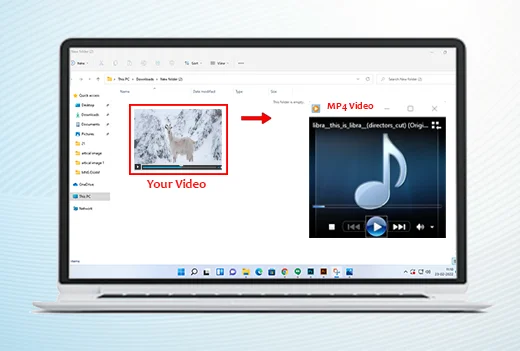
Once you have downloaded the Vimeo video on your desktop, go to the section where you have downloaded the video.
Click the Play button to run the video. Your Vimeo video will start playing on your PC. You can also save the Vimeo video on your desktop and watch it later.
For this, you have to click the “Save video” option and your Vimeo video will be saved on your computer.
Keep downloading is an free online video downloader which facilitates its users to download online videos from different apps by just copying the URL of that particular video and pasting on to its website.
Vimeo is a premium video hosting and sharing platform known for its high-quality content and ad-free viewing experience. Founded in 2004, Vimeo is home to filmmakers, artists, and creative professionals who share their work in stunning HD and 4K quality. Unlike other video platforms, Vimeo focuses on quality over quantity, attracting professional content creators, independent filmmakers, and businesses. The platform supports videos up to 8K resolution and offers advanced privacy controls, making it a favorite among professionals who want to showcase their work.
Our Vimeo video downloader makes saving videos simple and fast. First, find the video you want to download on Vimeo.com and copy its URL from the browser address bar. Then paste the URL into our downloader tool and click the download button. Our servers will process the video and provide you with download links in multiple quality options including SD, HD (720p), Full HD (1080p), and 4K when available. The entire process takes just a few seconds and works on any device or browser.
Our downloader supports multiple video quality options for Vimeo videos. You can choose from standard definition (SD), high definition (720p), Full HD (1080p), and 4K resolution depending on what the uploader has made available. All videos are downloaded in MP4 format, which is universally compatible with every device, media player, and video editing software. The audio quality is preserved along with the video, ensuring you get the complete viewing experience.
KeepDownloading is the fastest and most reliable Vimeo video downloader available online. Our tool supports all public Vimeo videos, offers multiple quality options, and requires no registration or software installation. We process downloads instantly on our high-speed servers, so you never have to wait. The service is completely free with no download limits, no ads interrupting your experience, and works 24/7. Whether you need to save a tutorial, a creative film, or a business presentation, our tool handles it all.
You can download any public Vimeo video that the uploader has not restricted from downloading. Some Vimeo creators disable downloads for their videos through privacy settings. If a video is password-protected or set to private, our tool cannot access it.
Downloading publicly available Vimeo videos for personal offline viewing is generally acceptable. However, you should always respect the content creator's rights and Vimeo's terms of service. Do not redistribute or use downloaded videos commercially without proper permission from the creator.
Our Vimeo downloader offers multiple quality options including SD (360p/480p), HD (720p), Full HD (1080p), and 4K (2160p). The available qualities depend on what the video uploader has provided. We always offer the highest quality available for each video.
No, our Vimeo video downloader is entirely web-based. It works directly in your browser on any device including Windows, Mac, Linux, Android, and iOS. No software downloads, browser extensions, or plugins are required.
The download process is very fast. After pasting the URL and clicking download, our servers process the video within seconds. The actual download time depends on the video file size and your internet connection speed.
Yes, our Vimeo downloader works perfectly on all mobile devices. Open our website in your phone's browser (Chrome, Safari, Firefox, etc.), paste the Vimeo video URL, select your preferred quality, and download. The video will be saved to your device's download folder.